Ryan Hovind

ONLINE ORIENTATION:

Onboarding Simulation

Role: Instructional Designer & Multimedia Lead

A scenario-based, SCORM-compliant onboarding experience designed to replace a linear video model with a learner-led, performance-driven assessment.

Learners must demonstrate readiness through branching scenarios and pass/fail LMS tracking before taking assessment tests or meeting with staff. This feedback-driven, self-paced approach qualifies learners upfront and is designed to reduce staff onboarding time.

Coming Soon

Project Overview Video

A short walkthrough explaining the problem, the solution, and my design decisions.

The Audience

17,000+ incoming students at Glendale Community College navigating their first transition into higher education.

My Responsibilities

Instructional Design, 4K Green Screen Media Production (Filming & Editing), Scriptwriting from SME content, eLearning Development, Storyboarding, and UI/UX Design. SCORM Tracking.

Tools I Used

Articulate Storyline 360, Articulate Rise, Adobe Premiere Pro, Photoshop, After Effects, ChatGPT, and Canva.

The Problem

Glendale Community College (GCC) faced a significant scalability challenge: onboarding new students through a system that prioritized content delivery over student readiness. While the existing orientation was visually engaging, the passive delivery model resulted in nontrackable eLearning that offered no insight into student competency. This “data gap” created an institutional bottleneck, forcing academic advisors to spend critical one-on-one time addressing foundational logistics rather than providing high-impact guidance.

The Solution

To resolve this efficiency gap, I designed a performance-driven simulation that shifts the orientation from a media asset into a measurable learning system. By requiring learners to demonstrate mastery in a sandboxed environment, this methodology optimizes staff resources by qualifying students upfront. The result is a scalable onboarding ecosystem that boosts student retention and self-efficacy while significantly reducing the administrative cost of student intake.

My Process: The Strategy Map

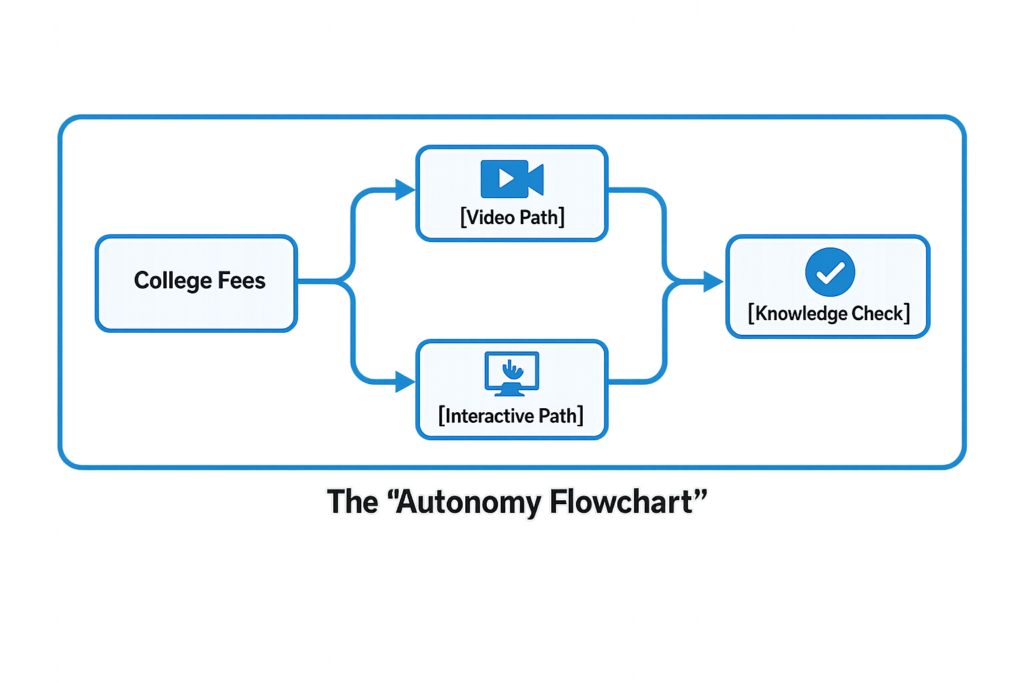
Before building in Storyline, I developed a high-level logic map to ensure the project supported Self-Directed Learning (SDL) Theory. Instead of a “locked” linear path, I designed a multi-modal architecture where learners choose their preferred medium—Video, Interactive Module, or both. This Universal Design for Learning (UDL) approach respects learner autonomy, supports diverse accessibility needs, and increases intrinsic motivation.

01. The Problem: Moving Beyond “Smilesheets”

Original Project: High-Fidelity Media Production
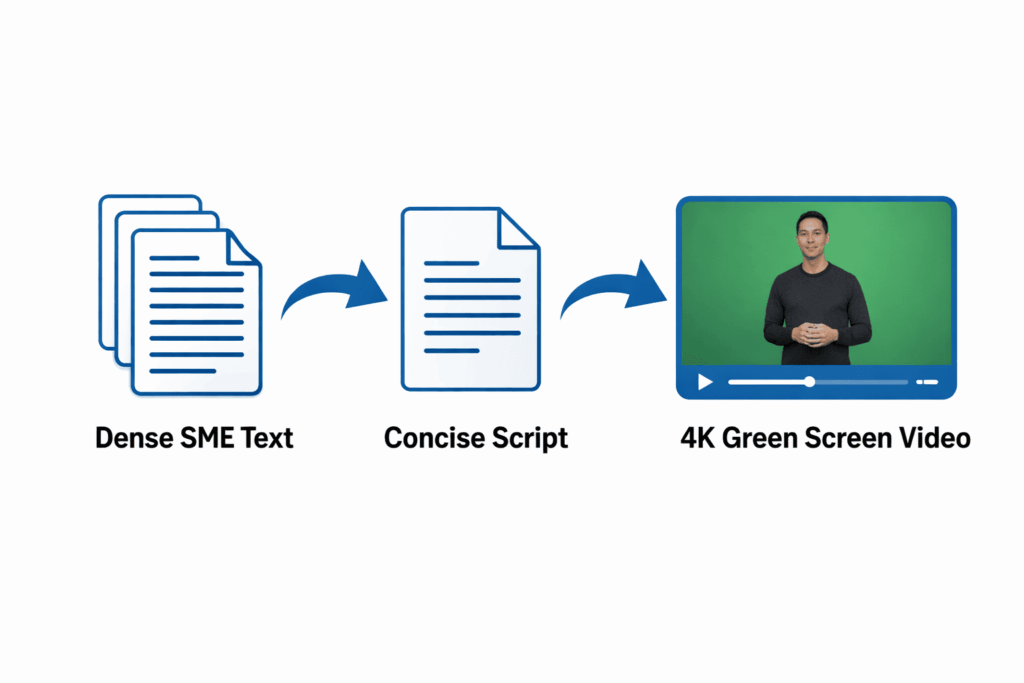
I was initially hired to lead the end-to-end multimedia production for GCC’s orientation. This involved distilling high volumes of SME text into concise scripts, followed by filming, editing, and designing motion graphics for nine 4K green-screen videos using Adobe Premiere, Photoshop, and After Effects.

The Pivot: The "Black Box" Problem

While the production quality of the original project was top-tier, I identified a critical gap: high-end video alone is effective at Kirkpatrick Level 1 (Reaction), but it offers no data for Levels 2, 3, or 4. (Learning, Behavior, and Results). Students reported high satisfaction after watching the videos, but the institution could not verify if they:

  • Understand essential fees, health services, and assessment requirements.
  • Could successfully navigate student academic and social programs.
  • Were prepared for their first high-stakes advising interaction.

The Cost of Inaction: Without behavioral verification, advisors spent significant time re-teaching foundational logistics instead of providing high-impact academic guidance—a clear ROI failure—which led to the development of the Interactive Path simulation.

02. The Solution:

The Kirkpatrick Pivot

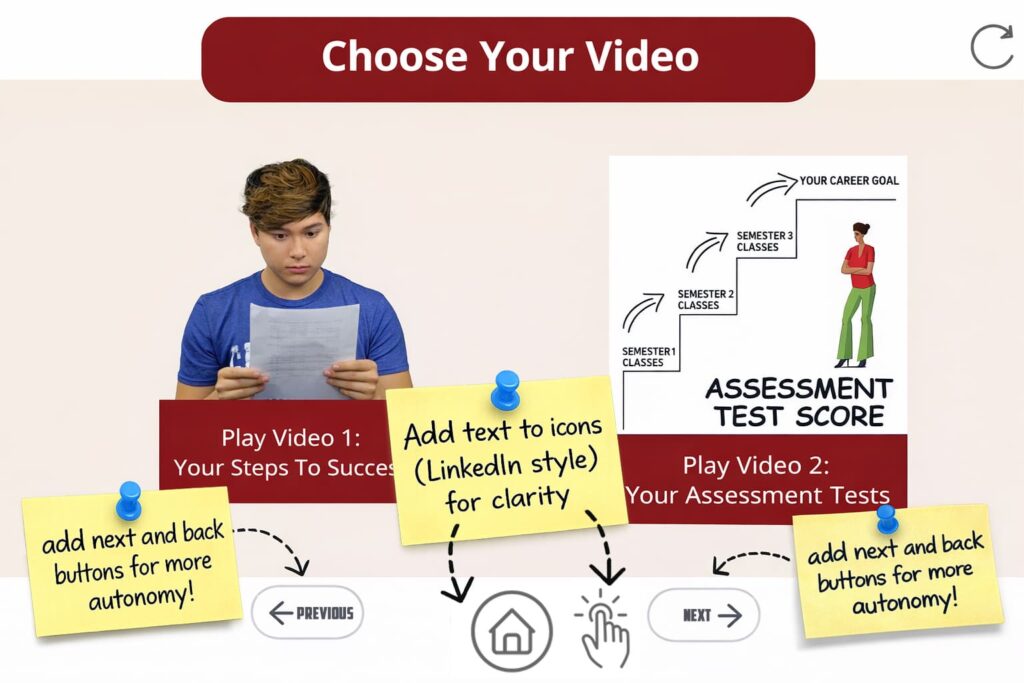
I designed this interactive simulation to shift orientation into a measurable learning system. Guided by Self-Directed Learning (SDL) Theory and Mayer’s Principles, the new “Menu-Based” navigation in Storyline allows diverse students to self-select topics—from student clubs to assessment tests—ensuring the experience feels personal rather than procedural. The branching experience replaces passive viewing with challenge-based assessments and instructional feedback loops that provide corrective guidance in real-time.

Through sandboxed registration tasks and an AI-assisted assessment, this orientation simulation becomes a measurable learning system rather than a media asset.

The "Just-in-Time" Resource

To support students beyond the digital screen, I developed a downloadable Performance Support Roadmap. Recognizing that orientation is one step in a complex lifecycle, this checklist sequences critical tasks—from account setup to advising—providing a clear path to completion in the “real world”.

03. Institutional Impact: Efficiency & Retention

This interactive model is designed to support three institution-level outcomes:

Optimized Counselor Workload:

By automating procedural orientation, we eliminate repetitive inquiries and administrative friction. This reclaims valuable time for staff, allowing counselors to pivot from basic troubleshooting to high-impact, personalized student interventions.

Increased Student Retention:

Data-driven onboarding is a primary predictor of long-term success. By ensuring students are fully oriented before day one, the simulation directly supports higher fall-to-spring retention rates and improved academic performance.

Elevated Self-Efficacy & Preparedness:

The simulation builds student confidence by requiring active navigation of campus systems. This ensures learners arrive prepared and motivated—key indicators for reducing early-semester “churn” and student withdrawal.

04. Technical Build: The Production Pipeline
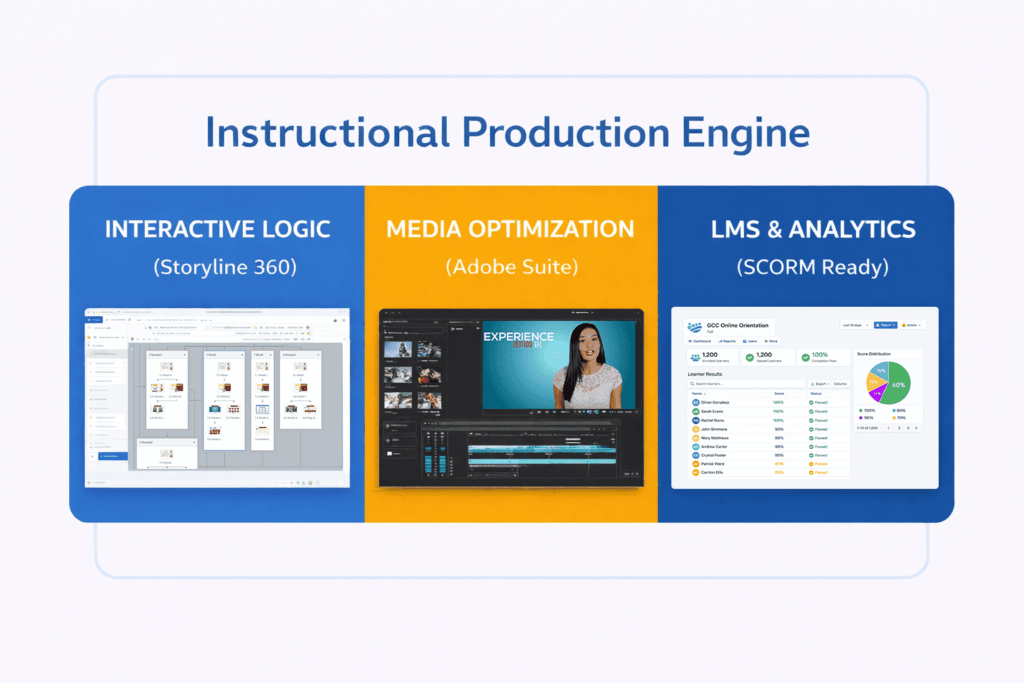
This project demonstrates my ability to manage a full-cycle instructional design and high-end media workflow:

Articulate Storyline 360:

Built custom branching logic, variables, and a persistent progress system to support learner orientation and reduce cognitive load.

Adobe Creative Suite:

Repurposed my original 4K media using Premiere and Photoshop to ensure the simulation felt like a seamless, on-brand extension of the institution.

Data-Ready Design:

Structured the experience to be LMS-deployable and SCORM-trackable, enabling administrators to capture personalized completion data, assessment performance, and decision-path trends for continuous improvement.

05. Peer Review & Iteration

To ensure the “Autonomy-First” architecture met enterprise standards for usability, I conducted internal QA testing with three senior eLearning specialists. This feedback loop was critical for balancing user freedom with instructional guardrails:

Accessibility & Compliance:

Conducted a rigorous review of contrast ratios and closed-captioning to ensure WCAG 2.1 compliance.

Mobile-First UX:

Optimized the mobile experience by refactoring hover-state triggers and implementing a LinkedIn-Style navigation UI for intuitive, touch-screen use.

UX Scaffolding:

Based on usability testing, I integrated “Previous/Next” navigation controls to allow for a self-paced review. This will reduce cognitive load during complex tasks and reinforce Self-Directed Learning (SDL) success.

06. Future Impact: Scaling the Vision

While this simulation serves as a highly functional proof of concept, it identifies clear opportunities for enterprise-scale expansion to further drive institutional ROI:

AI-Integrated Personalization:

Potential for implementing a Machine Learning (ML) chatbot that leverages the learner’s specific assessment data to provide personalized, automated coaching in real-time.

Predictive Performance Analytics:

Opportunities to utilize SCORM data modeling to identify “at-risk” behaviors early in the onboarding cycle, triggering automated, data-driven interventions.

Global Localization:

Scalability for multilingual deployment (Spanish and Armenian) to ensure accessibility for a diverse, globalized user base.